

Digital Delivery for Offsite Construction
Keep each component connected to its current decision, status and evidence.
NAPS structures digital delivery for modular, panelized and hybrid projects. We help teams connect approved design information to quantities, procurement, factory work, transport, installation, inspection and handover records. The controlled data chain shows what changed, who approved it and which physical item the record describes.
Send the current models, quantity files, production workflow and reporting needs. We will define the information, identifiers, systems, owners and evidence needed at each handoff.

What is digital delivery for offsite construction?
Digital delivery is the controlled production, exchange, review and use of project information across design, procurement, manufacturing, transport, site work and handover. For offsite construction, it links each module, panel or assembly to current drawings, quantities, materials, status, quality records, location and approvals.
It is a business process supported by technology. Buying software does not create a reliable data chain.
Key terms
BIM
organizes digital asset information for design, construction and operating decisions. It is more than a 3D model.
Common data environment, or CDE
is the agreed workflow and technology for producing, reviewing, authorizing and retaining project information.
Dashboard
presents selected measures and status. It does not prove that source data is complete or approved.
Digital thread
links an item, decision or dataset across stages and systems.
Digital twin
is a maintained digital representation connected to a physical asset or process and updated for a defined use.
Use the most accurate term. A static model, file archive or dashboard is not a digital twin.
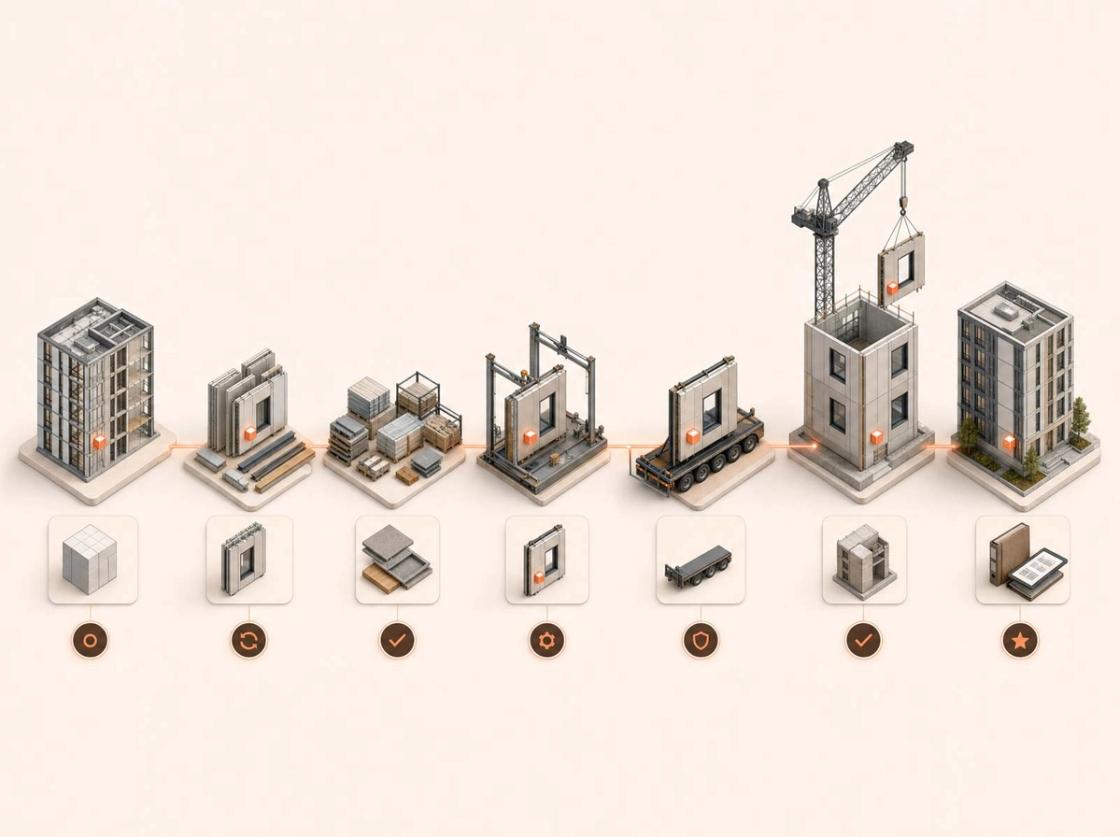
One controlled data chain
-
Design
Authorized geometry, properties, specifications, interfaces, revision and decision records
-
Quantities and procurement
Checked quantities or BOM linked to source objects, rules, exclusions and approved products
-
Factory planning and production
Released work packages, allowed status changes, quality holds and evidence linked to item IDs
-
Packing and transport
Item-to-package links, condition, custody, release and shipment events
-
Site receiving and installation
Arrival, condition, location, current instruction, installation and exception records
-
Inspection and handover
Tests, deficiencies, acceptance, installed-asset data, warranties and current documents
The link must survive change. A file name alone is not a stable connection between a design object and a physical component.
Stable identifiers make traceability possible
Each tracked item needs an identifier that remains stable while its status, location and linked records change.
Recommended hierarchy: Project → building → level or zone → module or panel → assembly → component → package or shipment → installed asset.
Define whether tracking occurs by type, batch, package or individual item. Keep human-readable labels separate from internal IDs. Record parent-child relationships, replacements, substitutions, splits, mergers and rework without deleting history.
Barcodes, QR codes or RFID add value only after the team defines the identifier, scan event, device, offline process and system of record. Track items that affect release, quality, logistics, payment, approval, maintenance or risk—not every object simply because it exists.
From model data to quantities and production
A bill of materials is only as reliable as its source data.
Before use, the team must define:
- the authoritative model or dataset;
- included and excluded objects;
- required classification and properties;
- units, waste, cut, pack and purchasing rules;
- modeled work, allowances and non-modeled items;
- assembly breakdown and validation checks;
- source revision, extraction time and independent control total;
- the person authorized to approve the output.
When the design changes, the workflow must identify affected quantities, purchases, work packages, built items and site instructions. It must preserve the earlier record rather than silently overwrite it.
The NAPS digital-delivery process
-
Define decisions and information needs
Review the offsite system, contracts, stages, approvals, reporting needs and current tools. Define what is needed, when, by whom and for what decision.
output: Digital-delivery brief, responsibility matrix and information requirements.
-
Map systems and authoritative sources
Identify design, document, quantity, procurement, production, quality, logistics, site and handover systems. Assign each data type an owner and exchange method.
output: System map, integration register and ownership matrix.
-
Define data and identifiers
Set the item hierarchy, classes, required properties, IDs, statuses, locations, events and relationships.
output: Data dictionary, identifier plan, status model and exchange rules.
-
Set the information workflow
Define work-in-progress, review, authorization, superseded and archived states with naming, approval, retention and access rules.
output: CDE workflow, review gates and audit requirements.
-
Connect models to quantities and production
Map approved objects and properties to materials, quantities, work packages and production information. Validate missing, duplicate and invalid data.
output: Model-to-BOM mapping and controlled production dataset where included.
-
Configure status and evidence tracking
Give each tracked item allowed status changes, event owners, timestamps and evidence requirements from factory through installation.
output: Tracking rules, evidence checklist and dashboard views.
-
Test before rollout
Run a representative module, panel or work package through the complete chain. Test field use, permissions, offline conditions, errors, exports and recovery.
output: Pilot findings, corrected rules and rollout plan.
-
Control changes and handover
Route design, product, production and site changes through one recorded process. Map installed items to current records and owner-required data.
output: Change history, final status register and digital handover package.
State the capability that is actually live
Digital workflows can be:
-
Controlled
Files and registers have owners, revisions and approval rules.
-
Linked
Stable identifiers connect items, documents, quantities, events and evidence.
-
Integrated
Systems exchange selected data through controlled files or APIs.
-
Automated
Defined rules complete a repeatable task with managed exceptions and human approval.
-
Synchronized
A digital representation receives current physical data for a stated use.
Do not call a manual daily update “real-time.” Show the last update, expected interval, scope and data source. Use “digital twin” only when the physical connection, update cycle and operating use are proven.
Human control, ownership and security
Human control
Parametric design, model checks, BOM generation, status updates and AI-assisted document work can support delivery. Every use needs defined inputs, rules, exceptions, source links and responsible review before action.
Ownership and security
The contract must identify data owners, system owners, authors, reviewers, approvers and users. Access should follow role and least-privilege needs. Use multi-factor authentication, audit history, secure exchange, backups, retention rules and an incident process where required.
Important: Do not place confidential project data in an unapproved AI service. Confirm privacy, security, data-residency and client duties before connecting platforms or sharing records.
Typical deliverables
The signed scope selects the required outputs.
-
Digital-delivery brief and system map
Defines decisions, systems, sources, owners and exchanges
-
Data dictionary and identifier plan
Defines objects, properties, relationships, IDs and classifications
-
Information and approval workflow
Controls status, revision, authorization, retention and access
-
Model-to-BOM and validation rules
Connects approved data to checked quantities and production inputs
-
Tracking and evidence configuration
Defines item status, events, timestamps, exceptions and dashboard views
-
Change history and digital handover
Preserves decisions and connects installed items to current owner records
A live platform, integration, automation, digital twin or real-time dashboard is not listed until its working capability and scope are verified.
Frequently asked questions
What is digital delivery in offsite construction?
It controls project information from design through procurement, factory production, transport, site installation and handover. It links each tracked item to its current data, status, evidence, revision and approval.
What is the difference between BIM and a digital twin?
BIM organizes digital asset information for project decisions. A digital twin adds a maintained connection to a physical asset or process and receives current data for a defined monitoring, simulation or decision use.
Does a digital twin need live data?
It needs a defined physical connection and update cycle that fits its purpose. Use “real-time” only when the source, update rate, latency and operating use are proven. A scheduled update may be sufficient but must be described accurately.
How can design data create a bill of materials?
Model objects need stable classification, complete properties and clear quantity rules. The workflow extracts and checks the data, records the source revision and requires approval before procurement or production use.
How can modules, panels and assemblies be tracked?
Give each tracked item a stable identifier. Record controlled events for production, quality, packing, shipping, receiving, installation and acceptance. Link each event to its source, time, location and required evidence.
What happens when design changes after production starts?
The change process identifies affected quantities, purchases, work packages, completed items and site instructions. A responsible party reviews the effect and authorizes new information without deleting the earlier history.
Connect the data before production depends on it
Send the current models, quantities, production, quality, logistics and reporting workflows. NAPS will help define the data chain, identifiers, status rules, integrations and evidence needed for the project.
Serving professional project teams across Canada and the United States, subject to scope, access, data policy and partner availability.